The Government of India has taken a major leap towards digital capacity building of government employees by launching the iGOT Karmayogi Portal. This platform is a key pillar of the National Programme for Civil Services Capacity Building (NPCSCB), also known as Mission Karmayogi. Through this initiative, government officials can continuously upgrade their skills, knowledge, and competencies using modern digital learning tools.
In this detailed guide, we will explain HOW TO REGISTER ON IGOT KARMAYOGI PORTAL step by step, using simple language so that even first-time users can easily complete the registration and start learning. This blog is specially written for teachers, government employees, contractual staff, and all officials associated with central or state government services.
Table of Contents
ToggleWhat is iGOT Karmayogi Portal?
The Integrated Government Online Training (iGOT) Karmayogi Portal is a digital learning ecosystem developed by the Government of India. It provides competency-based courses, role-based learning paths, and self-paced modules for government employees.
The platform focuses on:
Capacity building
Continuous professional development
Outcome-based learning
Digital governance
Courses available on the portal are designed by reputed institutions and ministries and are aligned with real service needs.
Who Can Register on iGOT Karmayogi?
Before understanding HOW TO REGISTER ON IGOT KARMAYOGI PORTAL, it is important to know who is eligible.
Eligible users include:
Central Government employees
State Government employees
Teachers and education department staff
Autonomous body employees
Contractual government staff (as permitted)
Officials working under Mission Mode Projects
If your mobile number is registered with your department, you can easily log in using OTP.
Why iGOT Karmayogi is Important for Government Employees
The iGOT Karmayogi platform is not just another learning portal. It plays a crucial role in career growth and service efficiency.
Key Benefits:
Free government-certified courses
Self-paced learning
Certificates after course completion
Courses similar to DIKSHA platform
Improves promotion and appraisal prospects
Learning aligned with service length and role
This is why many departments are now making registration mandatory.
Requirements Before Registration
Before proceeding with HOW TO REGISTER ON IGOT KARMAYOGI PORTAL, keep the following ready:
Smartphone with internet access
Registered mobile number
Android phone (for app users)
Basic knowledge of mobile apps
The portal can be accessed via mobile app as well as web browser.
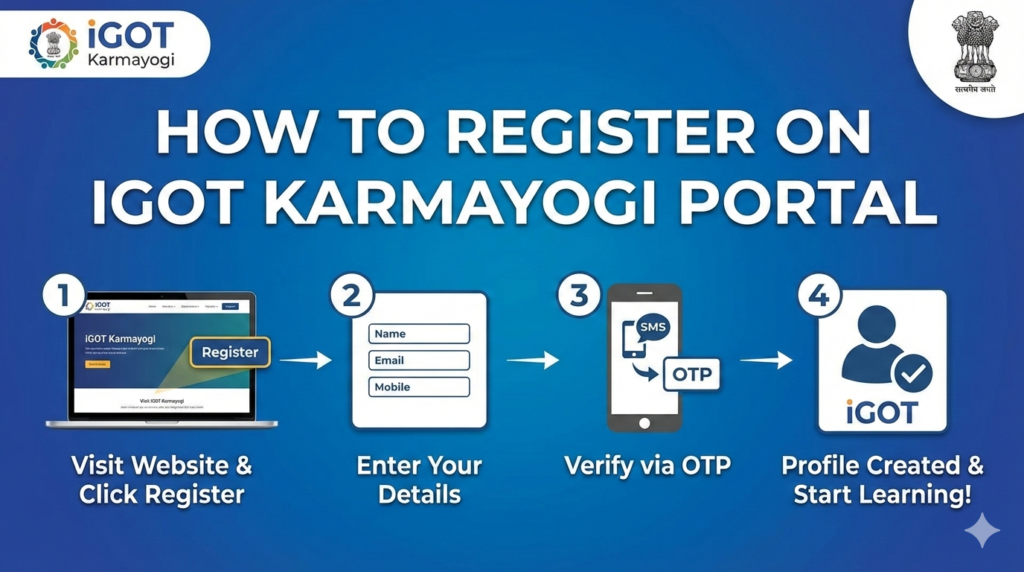
Step-by-Step Guide: HOW TO REGISTER ON IGOT KARMAYOGI PORTAL
Follow these simple steps carefully to complete your registration without errors.
Step 1: Download iGOT Karmayogi App
Open Google Play Store
Search for “iGOT Karmayogi”
Download and install the official app developed by the Government of India
Make sure you download the correct app to avoid fake or third-party applications.
Step 2: Open App and Login via OTP
Open the iGOT Karmayogi app
You will see a “Login through OTP” window
Enter your registered mobile number
Click on Proceed
Enter the OTP received on your mobile
This OTP-based login ensures secure access.
Step 3: Complete User Registration
After successful OTP verification:
The app will redirect you to the registration page
Fill in required details such as:
Name
Department
Designation
State / Organization
Submit the form
This step officially creates your iGOT Karmayogi profile.
Step 4: Access Dashboard
Once registered:
You will land on the user dashboard
The dashboard displays recommended courses
You can view notifications and learning paths
Now you are fully registered on the platform.
Step 5: Search Courses as Per Service Length
This step is very important in HOW TO REGISTER ON IGOT KARMAYOGI PORTAL process.
Click on the search 🔎 icon
Search for courses as per:
Length of service
Department requirement
Course details are usually shared by departments in PDF format
Choose the correct course to avoid repetition or rejection.
Step 6: Start Learning (Similar to DIKSHA App)
Click on Start Learning
Courses function similar to the DIKSHA app
Includes:
Videos
PDFs
Quizzes
Assessments
Complete all modules to unlock the certificate.
Certificates on iGOT Karmayogi
After completing a course:
Certificate is auto-generated
Available in dashboard
Can be downloaded as PDF
Useful for service records and appraisal
Certificates issued are officially recognized.
Common Mistakes to Avoid During Registration
While following HOW TO REGISTER ON IGOT KARMAYOGI PORTAL, avoid these mistakes:
Using unregistered mobile number
Skipping profile details
Selecting wrong department
Enrolling in incorrect course
Not completing assessments
Double-check all information before submission.
How iGOT Karmayogi Supports Mission Karmayogi
The portal is a digital backbone of Mission Karmayogi. It focuses on:
Citizen-centric governance
Digital India vision
Competency-driven HR management
Transparent learning records
This makes continuous learning mandatory for modern governance.
Technical Support on iGOT Karmayogi
If you face any issues:
Use in-app Help & Support
Contact departmental nodal officer
Check FAQs inside the app
Most login issues are resolved by OTP re-verification.
FAQs: HOW TO REGISTER ON IGOT KARMAYOGI PORTAL
Q1. Is iGOT Karmayogi registration free?
Yes, registration and courses on the portal are completely free for government employees.
Q2. Can I use iGOT Karmayogi on a computer?
Yes, you can access it via a web browser, but the mobile app offers better usability.
Q3. What if my mobile number is not registered?
Contact your department to update your mobile number before attempting login.
Q4. Are certificates mandatory?
In many departments, certificates are mandatory for appraisal, training compliance, or promotion.
Q5. Is iGOT Karmayogi similar to DIKSHA?
Yes, the learning experience is very similar to DIKSHA, with videos, PDFs, and quizzes.
Q6. Can I change my department details later?
Some details can be edited, but core information may require approval from nodal officers.
Q7. What should I do if OTP is not received?
Wait for a few minutes, ensure network connectivity, and try again.
Conclusion
Understanding HOW TO REGISTER ON IGOT KARMAYOGI PORTAL is essential for every government employee in today’s digital governance ecosystem. The platform not only enhances professional skills but also ensures readiness for future administrative challenges.
By following the steps explained above, you can easily register, select the correct course, and start learning without any confusion. Make sure to complete courses on time and download certificates for official use.