Table of Contents
ToggleHow to Apply for EMRS Mendhar Entrance Test 2026 : Step by Step Guide
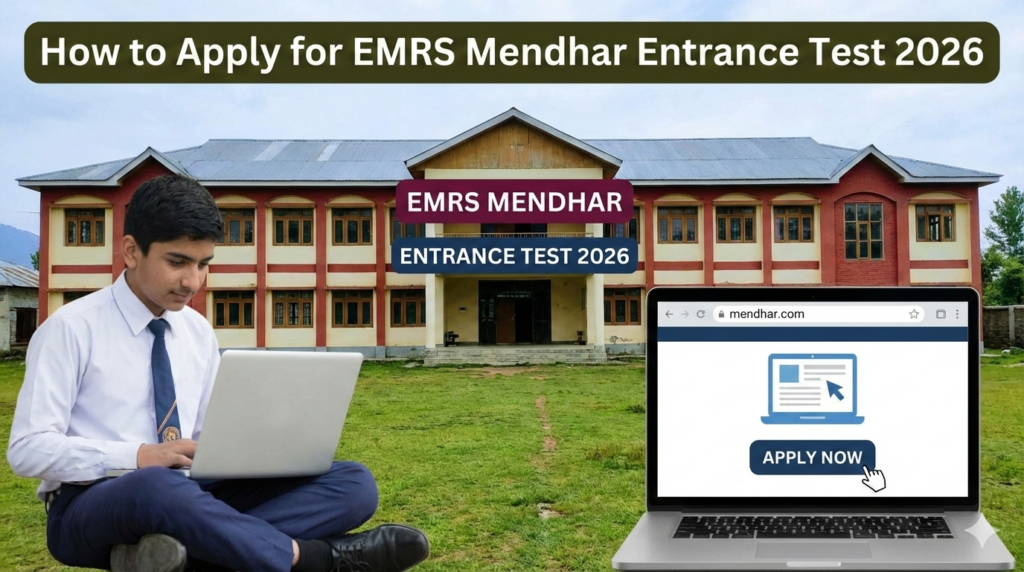
If you are planning to apply for EMRS Class VI admission, this updated guide is written exactly as per the latest Online Application Processing System interface shown in the registration and login images.
This detailed article explains How to Apply for EMRS Mendhar Entrance Test 2026 with clear step-by-step instructions based on the actual student registration and login dashboard.
The admission process is conducted under the supervision of the National Education Society for Tribal Students (NESTS), which manages EMRS schools across India.
About EMRS Mendhar
Eklavya Model Residential School Mendhar located in Mendhar provides free residential education to Scheduled Tribe (ST) students from Class VI to XII.
Students are selected through the EMRS Selection Test (ESSE) for Class VI admission.
If you follow the steps below carefully, you will clearly understand How to Apply for EMRS Mendhar Entrance Test 2026 without confusion.
Step-by-Step Guide: How to Apply for EMRS Mendhar Entrance Test 2026
Student Login
📘 New Student
Start your application
journey here
Recover UDISE / application ID
The application system has two main parts:
Student Registration
Student Login & Form Completion
Let’s understand both sections exactly as shown in the portal images.
STEP 1: Visit the Official Online Application Portal
Open the official EMRS Online Application Processing System.
On the homepage you will see:
Home
About
School Login
Student Login
Registration
Click on Registration if you are a new student.
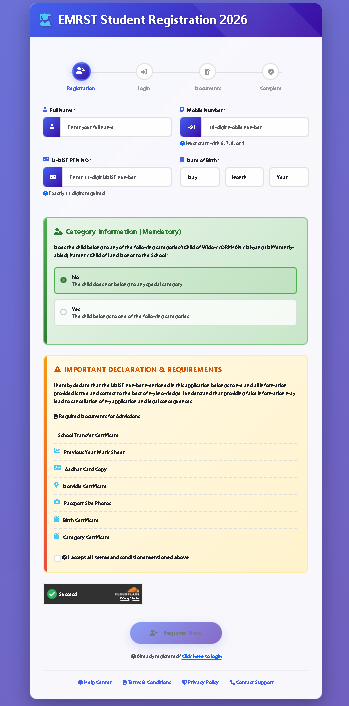
STEP 2: Fill EMRS Student Registration 2026 Form
After clicking Registration, the page titled:
“EMRS Student Registration 2026”
will open.
You will see the registration progress bar:
Registration
Login
Documents
Complete
Now fill the following details:
1️⃣ Full Name
Enter student’s name exactly as per school record.
2️⃣ Mobile Number
Enter a working mobile number. OTP verification may be required.
3️⃣ UDISE PEN Number
Enter 11-digit UDISE PEN number carefully.
(The portal clearly says “Exactly 11 digits required.”)
4️⃣ Date of Birth
Select:
Day
Month
Year
Make sure it matches the school records.
STEP 3: Category Information (Mandatory)
You will see a green section titled:
“Category Information (Mandatory)”
Select one option:
ST – Scheduled Tribe
PVTG (if applicable)
Since EMRS is primarily for ST students, choose the correct category carefully.
STEP 4: Important Declaration & Requirements
Below category section, there is an orange box titled:
IMPORTANT DECLARATION & REQUIREMENTS
You must confirm that you have the required documents:
Student Transfer Certificate
Previous Year Mark Sheet
Aadhaar Card Copy
Domicile Certificate
Parent/Guardian ID Proof
Bank Details (if required)
Category Certificate
Tick the declaration checkbox confirming:
“I declare that all information provided above is correct.”
Complete the captcha verification.
Then click the Register Now button.
This completes the first stage of How to Apply for EMRS Mendhar Entrance Test 2026.
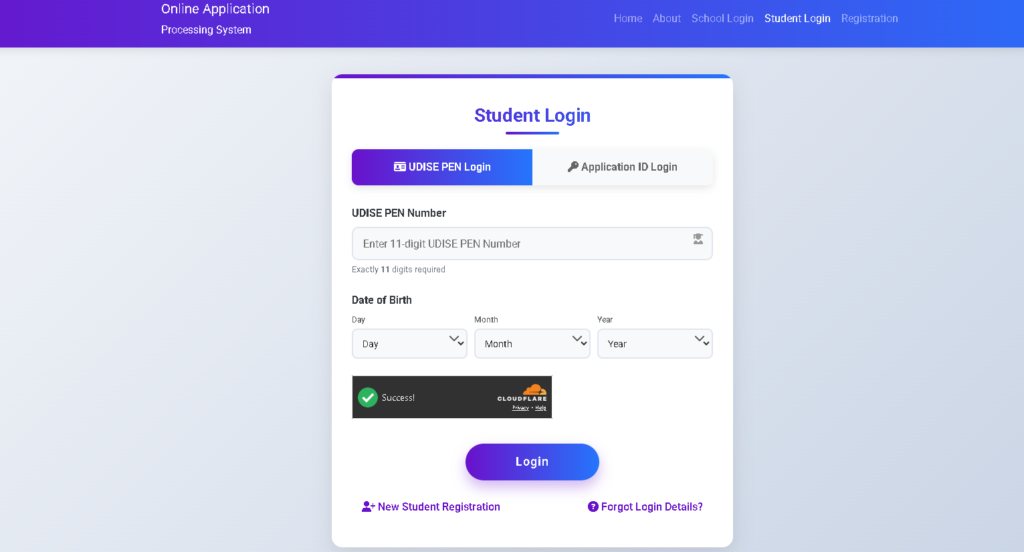
STEP 5: Student Login
After successful registration, go to Student Login page.
You will see two login options:
UDISE PEN Login
Application ID Login
Option 1: UDISE PEN Login
Enter:
11-digit UDISE PEN Number
Date of Birth (Day / Month / Year)
Complete captcha verification.
Click Login.
Option 2: Application ID Login
If you have received Application ID after registration, you can log in using:
Application ID
Date of Birth
STEP 6: Complete Application Form
After login, complete remaining sections:
Personal Details
Father’s Name
Mother’s Name
Address
District
State
Select school preference:
Choose EMRS Mendhar
Academic Details
Current School Name
Class V details
Marks (if required)
Upload Documents
Upload scanned copies of:
Passport size photograph
Signature
ST Certificate
Domicile Certificate
Aadhaar Card
Ensure file size and format are correct.
This is an important stage in understanding How to Apply for EMRS Mendhar Entrance Test 2026.
STEP 7: Final Submission
Before final submission:
✔ Recheck spelling
✔ Verify date of birth
✔ Confirm category
✔ Ensure documents are clear
Click Final Submit.
Download and print the confirmation page for future reference.
Now your application for How to Apply for EMRS Mendhar Entrance Test 2026 is successfully completed.
Exam Pattern for EMRS Class VI
The entrance exam generally includes:
Mental Ability
Mathematics
Language
General Awareness
All questions are objective type (MCQs).
Admit Card Download
Admit cards will be released on the same portal.
Steps:
Visit Student Login
Enter UDISE PEN or Application ID
Download Admit Card
Take printout
No candidate will be allowed without admit card.
Add Your Heading Text Here
Q1: Is there any application fee?
Generally, EMRS Class VI application is free.
Q2: Who can apply?
Only ST category students studying in Class V.
Q3: What is UDISE PEN?
It is an 11-digit student identification number issued by school.
Q4: Can I edit form after submission?
Editing depends on correction window availability.
Q5: Is EMRS Mendhar residential?
Yes, it is fully residential with free boarding and lodging.
Q6: What if I forget Application ID?
You can log in using UDISE PEN and Date of Birth.
Q7: Where is EMRS Mendhar located?
It is located in Mendhar, Jammu & Kashmir.
Applying through the Online Application Processing System is simple if done carefully. Follow every step explained above and complete your registration without errors.
This complete step-by-step guide on How to Apply for EMRS Mendhar Entrance Test 2026 ensures that parents from Mendhar and nearby areas can apply confidently and correctly.
For regular admission updates and preparation guides, keep visiting Mendhar.com.