Complete UDISE+ GIS Capture Guide
Your Step-by-Step Manual for School Data Collection & Verification
i About UDISE+ GIS Capture
The UDISE+ GIS Capture application is India's official mobile tool for collecting geotagged school data. Part of the Unified District Information System for Education Plus, this UDISE+ GIS Capture app enables accurate mapping of educational infrastructure nationwide. The UDISE+ GIS Capture system ensures standardized data collection through its intuitive interface.
Primary Objective
To create a comprehensive, accurate, and verified database of all educational institutions in India with precise geographical coordinates and visual documentation.
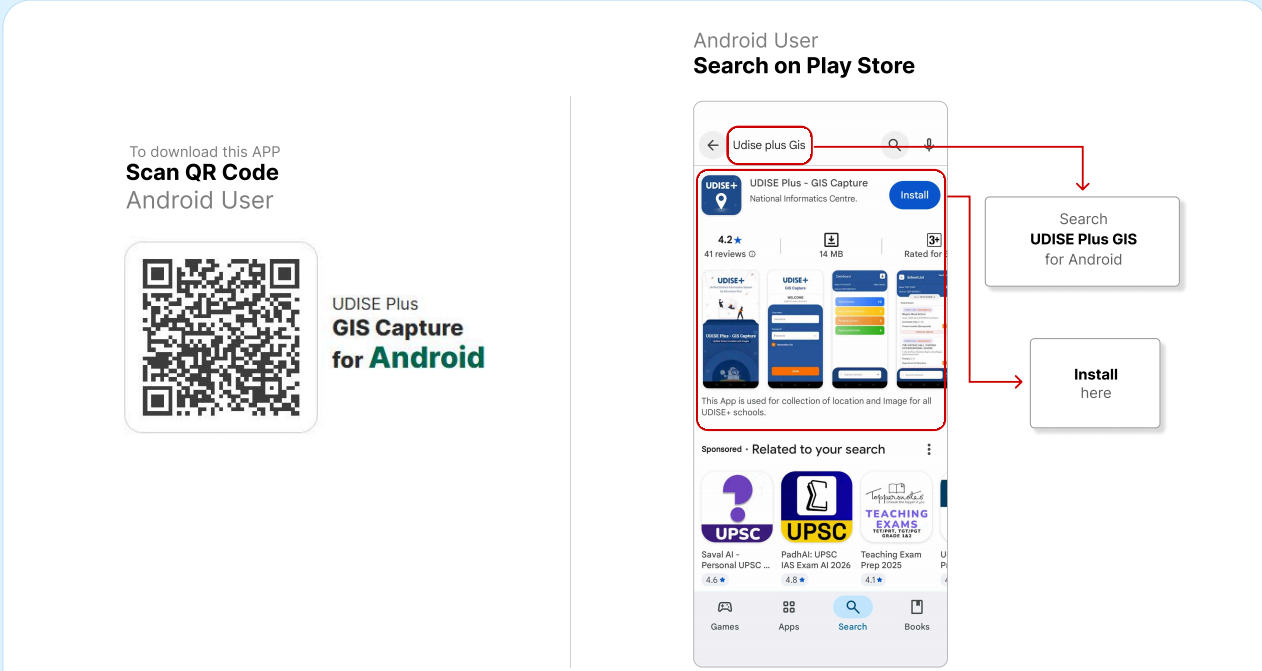
Figure 1: UDISE+ GIS Capture App Main Interface - The central hub for all data collection activities
1 App Installation Process
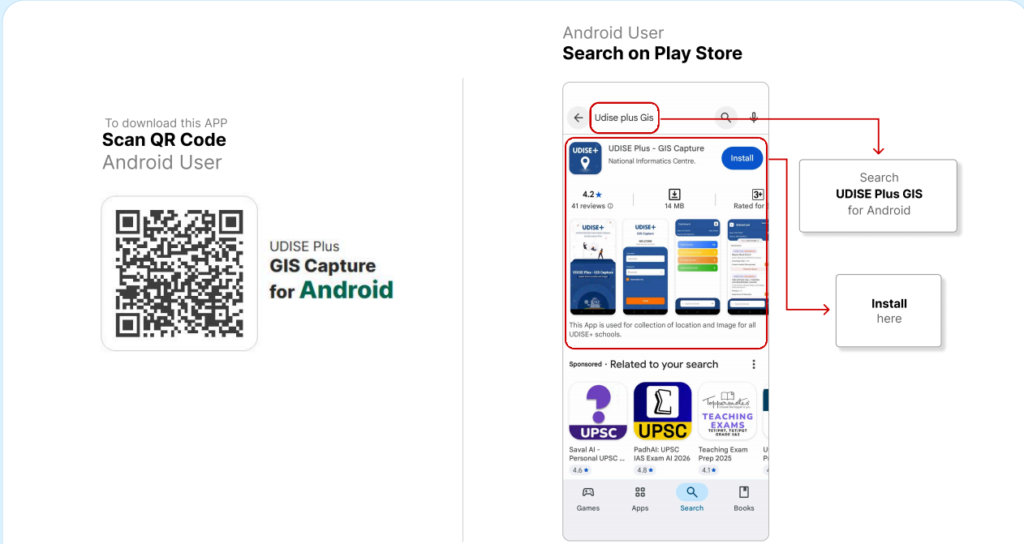
Downloading the UDISE+ GIS Capture application is your first step. Follow these platform-specific instructions:
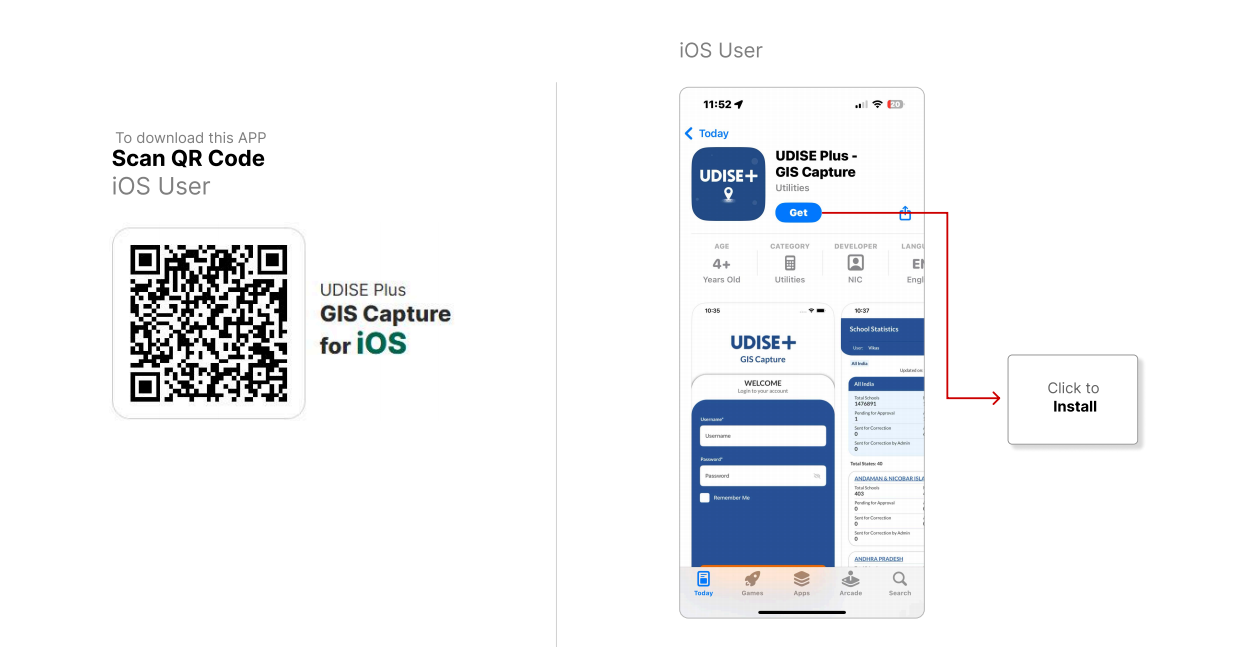
Figure 2: UDISE+ GIS Capture Installation Screens - QR code scanning and download process
💡 Installation Tips
2 Login Process for Different Users
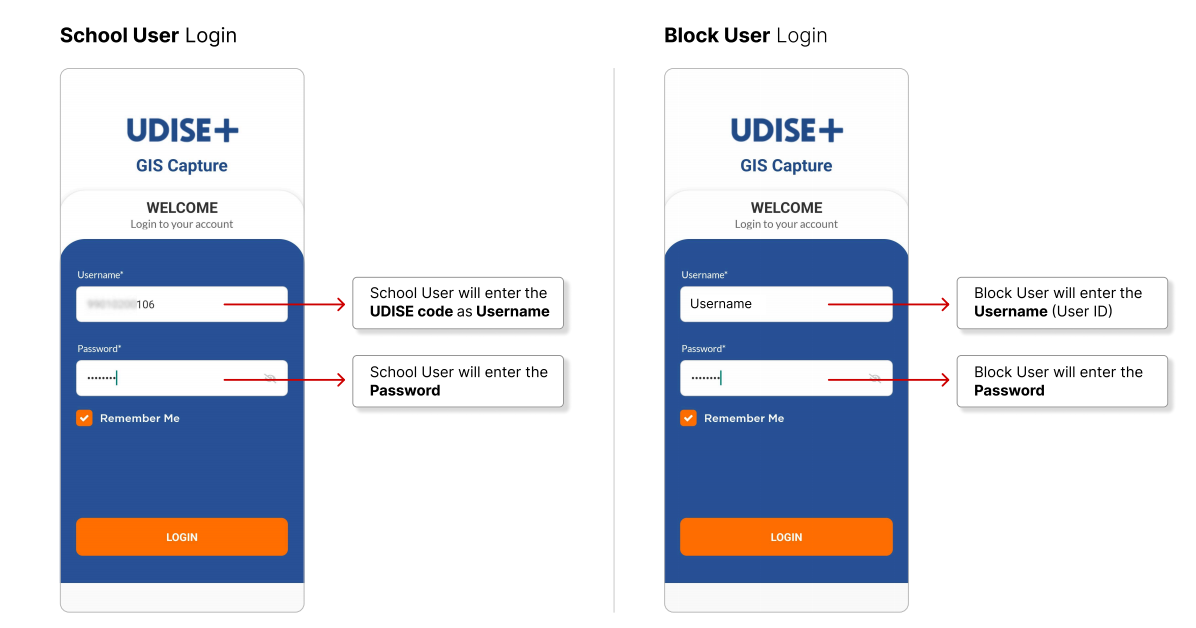
Figure 3: UDISE+ GIS Capture Login Interfaces - School, Block, and District user screens
🏫 School User
School principals or authorized staff members
🏢 Block User
Block Education Officers for verification
🗺️ District User
District Education Officers for final approval
⚠ Important Security Notice
Never share your UDISE+ GIS Capture login credentials. For password recovery, contact your administrative supervisor or visit password help →. For more details, check the security guidelines ↗.
3 Data Capture: Location & Photographs
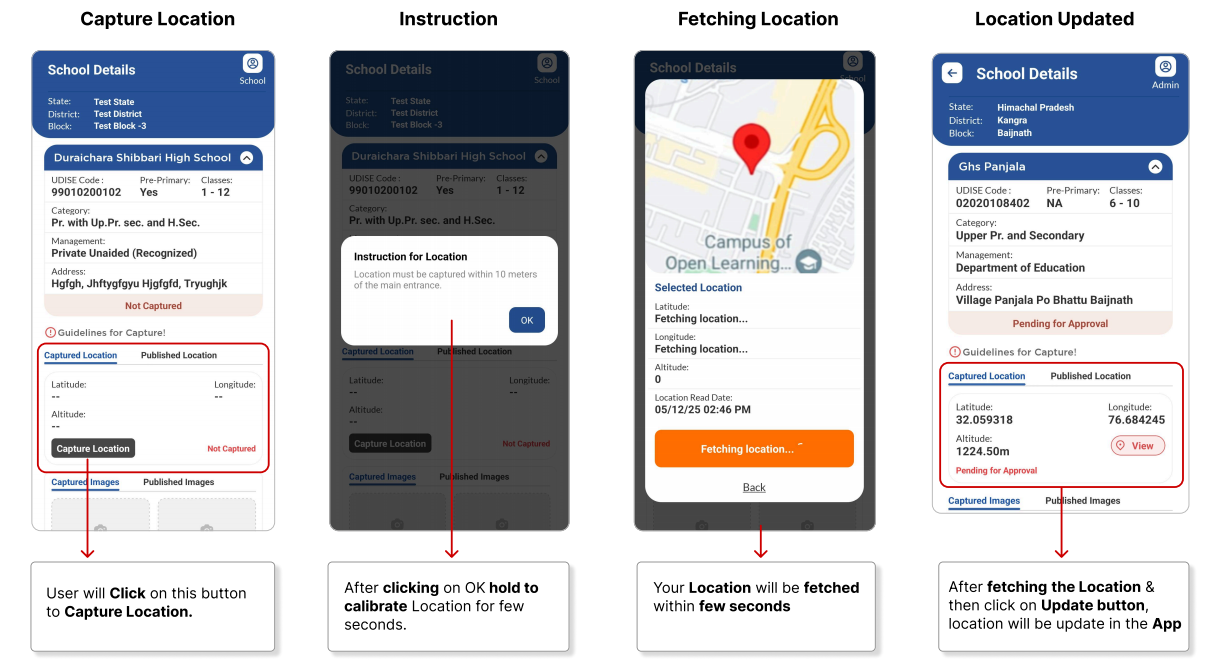
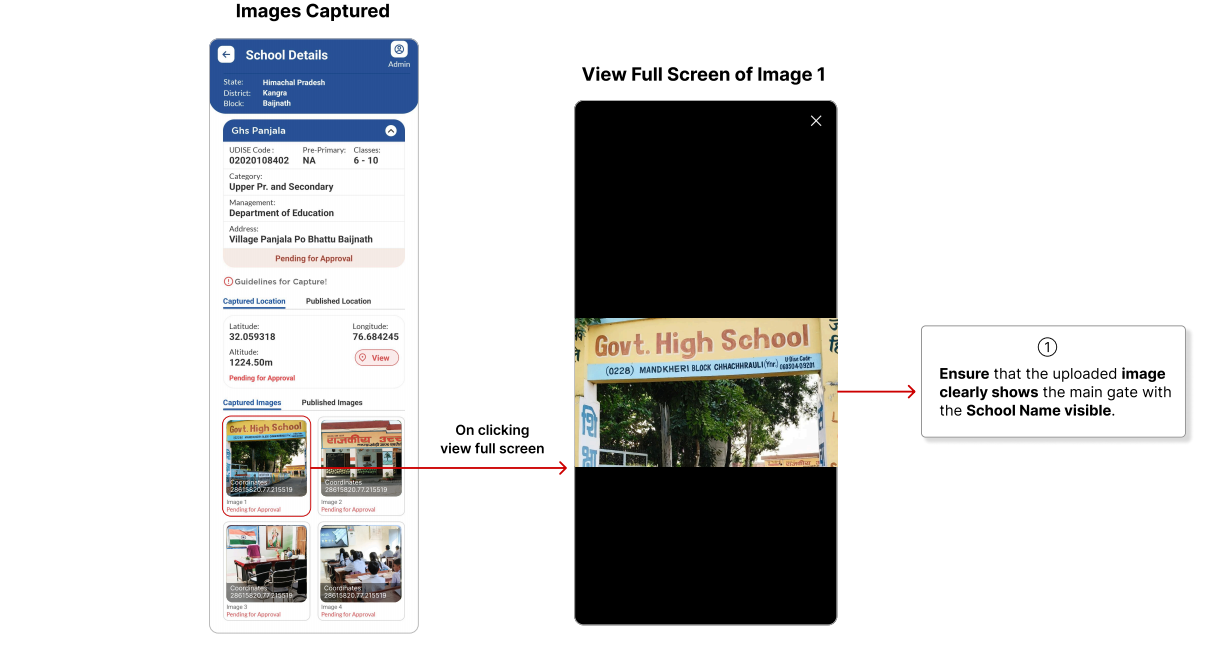
Figure 4: UDISE+ GIS Capture Data Collection Interface - Location capture and photography screens
📍 Location Capture Process
📸 Required Photographs
Main Gate
School's main entrance gate with visible name board
Main Building
Front view of primary school building with name
Additional View
Another building or different angle of main building
Internal Facility
Classroom or playground inside school premises
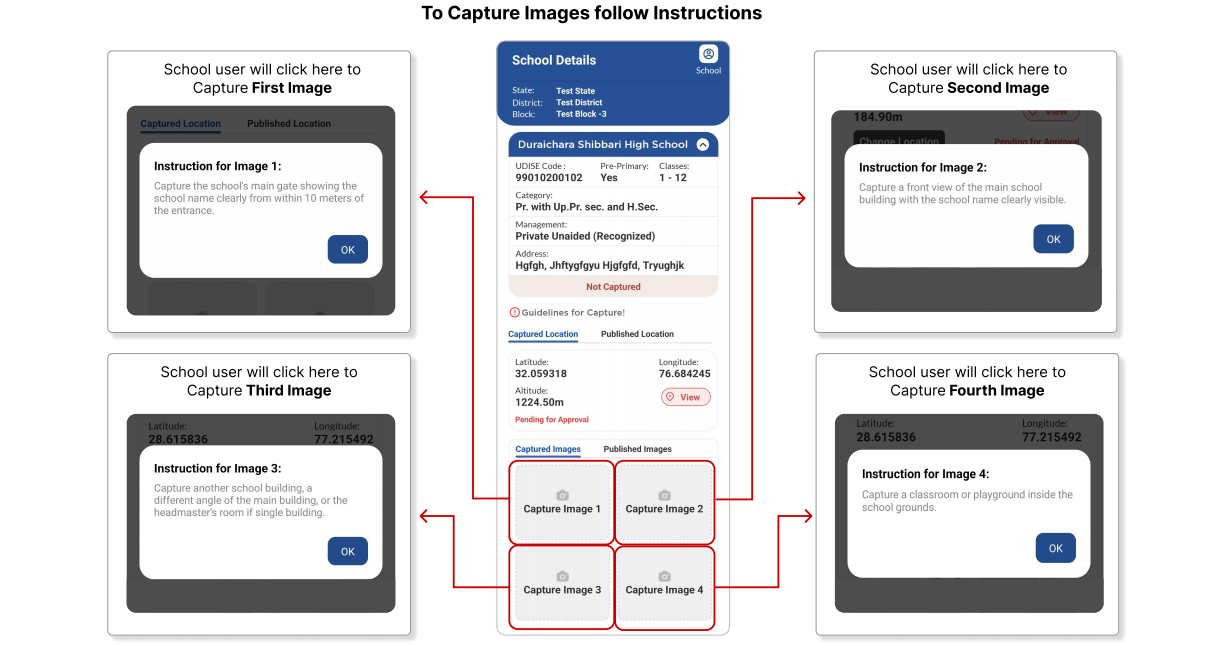
Figure 5: UDISE+ GIS Capture Photography Guidelines - Image requirements and quality standards
💡 Photography Best Practices
For detailed photography tutorials, visit our photo guide → or check the official standards ↗.
4 District Level Approval Process
After school users submit data through the UDISE+ GIS Capture app, district officials verify and approve submissions through this structured workflow.
District Approval Workflow
✅ Approval Guidelines
- Location coordinates are accurate
- All four photos meet requirements
- School name is clearly visible
- Images are clear and not blurred
- Location is incorrect
- Photos don't meet specifications
- School name not visible
- Images are blurred or dark
For district-level training materials, visit district training portal → or the official approval guide ↗.
? Frequently Asked Questions (FAQ)
Master the UDISE+ GIS Capture App
The UDISE+ GIS Capture application represents a significant advancement in educational data management. By following this comprehensive guide, you can effectively utilize the UDISE+ GIS Capture tool to contribute to India's digital education infrastructure mapping. Remember, accurate data collection through the UDISE+ GIS Capture system benefits planning, resource allocation, and educational development nationwide.
UDISE+ GIS Capture App Guide • Official Documentation
© 2025 UDISE+ Initiative • Ministry of Education, Government of India